8 Best WordPress Security Plugins to Protect Your Website in 2026
You open your site and something looks wrong. Strange links appear on your pages. Visitors land on shady websites. Google warns people that your site may be hacked. This happens to beginners every day. The good news is that WordPress hack prevention is easier than you think.
This guide covers the best WordPress security plugins in simple English. You get picks for every budget and skill level. We also explain WordPress website security step by step. Everything is updated for 2026. Want to browse on your own first? Try the WordPress plugin directory. Prices change often. Always check current plans on each official site.

Quick Picks: Best WordPress Security Plugins at a Glance
Short on time? Start with Wordfence or All-In-One Security. Both are free WordPress security plugins that are easy to set up. Worried about infections? Pick MalCare for WordPress malware removal. Want stronger WordPress login security? Choose Solid Security.
The table below shows each pick at a glance. Use it as a quick WordPress security comparison before you read the full reviews. Many of these WordPress security tools also offer premium WordPress security plugins plans with extra power.
| Plugin | Best For | Free Option |
|---|---|---|
| Wordfence Security | Best overall | Yes |
| Sucuri Security | Website firewall and monitoring | Yes (plugin only) |
| Solid Security | Login security and 2FA | Yes |
| MalCare | Malware scanning and removal | Limited |
| All-In-One Security (AIOS) | Best free option | Yes |
| Jetpack Security | Security plus backups | Limited |
| Cloudflare | CDN, DDoS, and WAF | Yes |
| Patchstack | Vulnerability protection | Yes (limited) |
Why Do You Need a WordPress Security Plugin?
WordPress runs roughly four in ten websites, according to W3Techs. That popularity makes it a big target. Think of a house with a lock but no alarm. The lock helps. The alarm tells you when something goes wrong.
Hackers use bots to scan thousands of sites every hour. They look for easy targets. Good WordPress security solutions work like an always-on alarm. They give you WordPress website protection day and night. The official WordPress hardening guide also covers the basics.
Protect Your Website from Hackers and Brute-Force Attacks
Bots try thousands of password guesses every day. This is a brute-force login attack. Good WordPress brute-force protection blocks the bot after a few failed tries. A WordPress firewall plugin adds malicious traffic filtering and IP address blocking. It also supports bot detection and mitigation, so fake visitors never reach your pages. Some tools add SQL injection protection and block cross-site scripting (XSS) attempts too.
Detect and Remove Malware
Malware hides in plain sight. It can inject spam links or send visitors to shady pages. Most beginners never notice until Google complains. A WordPress malware scanner checks your files for bad code. Strong WordPress malware detection uses malware signature scanning to match known threats. Some tools also offer one-click malware cleanup. That makes malware detection and removal far less scary.
Secure Login Pages and User Accounts
Your login page is your front door. Weak passwords make it easy to break in. Good plugins add login attempt limiting and two-factor authentication (2FA). This supports credential theft prevention because a stolen password is not enough on its own. They also help with unauthorized access prevention by spotting suspicious login activity. Together these steps improve WordPress login security.
Prevent Vulnerabilities and Monitor Suspicious Activity
Outdated add-ons are a top way hackers get in. Vulnerable WordPress plugins and outdated WordPress themes often hold known holes. A WordPress vulnerability scanner warns you early. Some flaws are zero-day vulnerabilities. No patch exists yet. Good WordPress security monitoring adds WordPress security alerts and a WordPress activity log plugin. This gives you WordPress threat detection and better security breach prevention.
How We Tested and Reviewed WordPress Security Plugins
Our review method focuses on what matters to real site owners. We judge each tool on four things: protection, detection, ease of use, and value. We study how it behaves on a clean site with common plugins and a popular theme. We also read the official feature lists and documentation.
Then we score every tool on the same scale. This keeps the review fair. It also helps us pick the best WordPress security plugins for beginners and small businesses. Features change often. Check each vendor’s current plan details before you buy.
| Criterion | What We Check |
|---|---|
| Protection | Firewall, hardening, and login tools |
| Detection | Scan quality, alerts, and false alarms |
| Ease of use | Setup time, dashboard, and compatibility |
| Value | Free limits, renewal prices, and support |
Security Features and Protection Capabilities
We start with the core WordPress security features. Does the plugin include a web application firewall (WAF)? Does it offer WordPress security hardening and virtual patching? We also look for file integrity checks and clear WordPress security configuration guides. A long feature list is nice. Features that work well matter more.
Malware Detection and Firewall Performance
Next we study scanner quality. A good WordPress malware scanner finds real threats fast and avoids false alarms. We review automated threat blocking, real-time threat intelligence, and security rule updates. Firewall speed matters too. A slow filter can hurt your website performance optimization efforts.
Ease of Use and Compatibility
Beginners need simple tools. We look at setup time, dashboard clarity, and help text. We also check security plugin compatibility with WooCommerce, page builders, and caching tools. A security tool that breaks your layout is not worth the risk. Clear menus and safe default settings earn higher marks.
Pricing, Value, and Customer Support
We compare free WordPress security plugins with premium WordPress security plugins. We note renewal costs because prices can jump after year one. Support quality counts too. Good help matters when your site is down. Always verify prices on each official site before you buy.
8 Best WordPress Security Plugins in 2026
Here are our picks for the best security plugins for WordPress in 2026. Each review shows who the tool suits and where it falls short. Some are classic plugins. Others are cloud services that work beside WordPress.
Three more names come up often. Shield Security bot protection helps stop fake traffic. BulletProof Security firewall rules suit people who like manual control. CleanTalk cloud-based security adds a cloud layer with spam filtering. They fill special needs. For most beginners the eight below are enough.
1. Wordfence Security — Best Overall WordPress Security Plugin
Wordfence is the top pick for most beginners. Its Wordfence firewall and malware scanner run inside your site. They give you WordPress malware detection, IP reputation monitoring, and malicious traffic filtering. The free version is strong. Premium adds real-time threat intelligence and faster security rule updates. The downside is higher server use on weak hosting. For many people it is the best WordPress security plugin to start with. See Wordfence.
2. Sucuri Security — Best for Website Firewall and Security Monitoring
Sucuri is built around its Sucuri website firewall. This WordPress website firewall is cloud-based. It gives you cloud-based firewall protection and strong defense against distributed denial-of-service (DDoS) attacks. It also offers cleanup help if you get hacked. The free plugin mostly handles WordPress security monitoring, audit trails and login logs, and hardening. The firewall itself needs a paid plan. Visit Sucuri.
3. Solid Security — Best for Login Security and Two-Factor Authentication
Solid Security was formerly called iThemes Security. Solid Security vulnerability protection pairs well with strong login tools. It supports two-factor authentication (2FA), login attempt limiting, and session management. It can also alert you to website file modification detection. Recent versions add passwordless authentication options such as passkeys. Some advanced features need the Pro plan. Visit SolidWP.
4. MalCare — Best for Malware Scanning and Malware Removal
MalCare scans your site from its own servers. That means a lighter load on your hosting. MalCare malware removal includes one-click malware cleanup on paid plans. It also offers a firewall and automated website backups. The free plan has limits and cleanup is a paid feature. This makes MalCare a good pick when WordPress malware removal is your top worry. Visit MalCare.
5. All-In-One Security (AIOS) — Best Free WordPress Security Plugin
All-In-One Security (AIOS) packs a lot into its free version. A security meter scores your site and shows what to fix next. It covers IP address blocking, WordPress brute-force protection, and file integrity checks. Beginners like the simple layout. Advanced malware tools need Premium. It is a top choice among free WordPress security plugins. Get AIOS.
6. Jetpack Security — Best for Integrated WordPress Security and Backups
Jetpack Security backups bundle real-time backups, scanning, and spam protection under one login. This gives you simple WordPress backup and recovery plus fast website restoration. It is less deep than a dedicated firewall plugin. Pricing is subscription based. Check current plans before you commit. Visit Jetpack.
7. Cloudflare — Best for CDN, DDoS Protection, and Web Application Firewall
Cloudflare DDoS protection works at the DNS level. It filters bad traffic before it hits your server. The free tier also adds a CDN and a basic web application firewall (WAF). It is not a WordPress malware scanner. Pair it with a plugin for WordPress site protection inside your dashboard. Visit Cloudflare.
8. Patchstack — Best for WordPress Vulnerability Protection
Patchstack virtual patching blocks attacks on known flaws until an official update arrives. It also tracks a large vulnerability database and sends alerts about risky plugins and themes. This adds WordPress plugin vulnerability protection and vulnerability monitoring. It does not replace a malware scanner. Check plan limits first. Visit Patchstack.
WordPress Security Plugins Comparison: Features, Pricing, and Best Use Cases
This table sums up all eight tools. We kept it simple so you can compare fast. These best WordPress security plugins each fit a different need.
Prices change often. Check each vendor before you buy. Use this WordPress security comparison alongside your own WordPress security features wish list.
| Plugin | Core Strength | Free Option | Backups |
|---|---|---|---|
| Wordfence | Firewall and malware scan | Yes | No |
| Sucuri | Cloud firewall and cleanup | Plugin only | No |
| Solid Security | Login protection and 2FA | Yes | Separate product |
| MalCare | Malware scan and removal | Limited | Yes (paid) |
| AIOS | Free all-round protection | Yes | No |
| Jetpack Security | Backups and scanning | Limited | Yes |
| Cloudflare | CDN, DDoS, and WAF | Yes | No |
| Patchstack | Vulnerability protection | Limited | No |
Free vs. Paid WordPress Security Plugins
A free plugin is like a basic lock. A paid plan is a full alarm system. Free WordPress security plugins cover firewall basics, scans, and logins. Premium WordPress security plugins add faster security rule updates, real-time threat intelligence, and priority support. Many sites start free. Then they upgrade once the site earns money or holds customer data.
Firewall, Malware Scanning, and Login Protection Compared
For firewall strength, Cloudflare and Sucuri lead because they work in the cloud. For scanning, MalCare and Wordfence stand out. For WordPress login security, Solid Security wins. No single tool does everything. Match the tool to your biggest risk. A blog with spam logins needs a strong WordPress firewall plugin and login tools first.

What Features Should You Look for in a WordPress Security Plugin?
Think of this section as your buyer’s checklist. Every feature solves a real problem. You do not need all of them on day one. Start with the basics and add more as your site grows.
Good WordPress security tools cover prevention, detection, and recovery. Prevention blocks attacks. Detection spots problems early. Recovery gets you back online fast. A solid WordPress security audit checks all three.
Web Application Firewall (WAF)
A web application firewall (WAF) blocks harmful requests before they do damage. A plugin-level firewall runs inside WordPress and works with server-level security rules. Cloud-based firewall protection stops traffic before it reaches your server. It also handles big floods from distributed denial-of-service (DDoS) attacks. Cloud options are faster at scale. Plugin options are easier to set up. Many sites use both.
Malware Scanning and Removal
Look for scheduled scans that run on their own. Next, check who fixes the problem. Some tools offer WordPress malware removal with one-click malware cleanup. Others only send an alert. Also check for website blacklist monitoring. It warns you if search engines flag your site. Beginners usually prefer tools that clean up for them.
Brute-Force Protection and Two-Factor Authentication
Good plugins limit login tries and add a CAPTCHA. They support two-factor authentication (2FA) and multi-factor authentication (MFA) with authenticator apps. Bigger teams may want Single Sign-On (SSO) through identity provider integration. miniOrange SAML SSO supports SAML 2.0 authentication for this. miniOrange two-factor authentication adds extra login steps. miniOrange REST API authentication secures apps that use OAuth 2.0 authentication or a JSON Web Token (JWT). Most small blogs do not need that much.
Vulnerability Detection and Virtual Patching
Sometimes a plugin has a flaw and no fix exists yet. Virtual patching acts like a temporary shield during that gap. A WordPress vulnerability scanner warns you which add-ons are at risk. Vulnerability monitoring keeps watching after install. Update as soon as a real fix arrives. This protects you from zero-day vulnerabilities and supports security breach prevention.
Security Alerts, Activity Logs, and File Integrity Monitoring
You cannot fix what you cannot see. WordPress security alerts and security event notifications tell you when something odd happens. A WordPress activity log plugin records who did what. WordPress file integrity monitoring spots changed core files. These audit trails and login logs help you trace a break-in.

Backup, Recovery, and Website Performance
Backups are your safety net. Automated website backups and database backup scheduling make WordPress backup and recovery simple. Good website restoration tools bring your site back in minutes. Also watch speed. Heavy tools can hurt website performance optimization. Test your page speed after you install a plugin. Keep copies off-site to support WordPress database security.
How to Choose the Best WordPress Security Plugin for Your Website
Use one simple rule. Match the plugin to your risk and not to the hype. A personal blog and a busy store face very different threats.
Ask yourself three questions. What am I protecting? How much time do I have? What can I afford? Your answers point to the right approach to WordPress security management.
Best Security Plugins for Beginners and Bloggers
Beginners need simple tools. All-In-One Security (AIOS) and Wordfence Free both fit well. They offer clear dashboards and safe default settings. You can set up basic WordPress site protection in about ten minutes. Turn on 2FA first. Then add scans and a backup tool. Upgrade later if your site grows.
Best Security Solutions for WooCommerce and Business Websites
Stores need more layers. Combine a firewall, scanning, and automated website backups. WordPress security for WooCommerce matters most around checkout pages. A breach hurts customer trust and sales. WordPress security for business websites should also use role-based access control (RBAC) and user access restrictions for staff. Wordfence Premium, Sucuri, or MalCare plus Jetpack backups make a solid stack.
Best Options for Agencies and Multiple WordPress Websites
Agencies manage many sites. Look for a multi-site dashboard, bulk licenses, and client reports. MalCare and Jetpack suit this well. Central WordPress security management saves hours each week. It also helps you show clients proof of WordPress website protection. Ask about security configuration auditing tools that check every site the same way.
How to Choose Between Free and Premium Plans
Stay free if your site is small and holds no private data. Upgrade when you handle customer information, earn revenue, or were hacked before. Here is a simple example. A bakery blog starts with a free plugin. Six months later it adds online orders. That is the moment to move to premium WordPress security plugins with a firewall and backups. A cleanup after an attack usually costs far more than a plan.
WordPress Security Plugins vs. Other Security Measures
A plugin is one layer of defense. Picture a castle with a moat, thick walls, and guards. Each layer slows the attacker down.
Your site needs the same idea. Plugins, hosting, and good habits work together. Let us see how they compare.
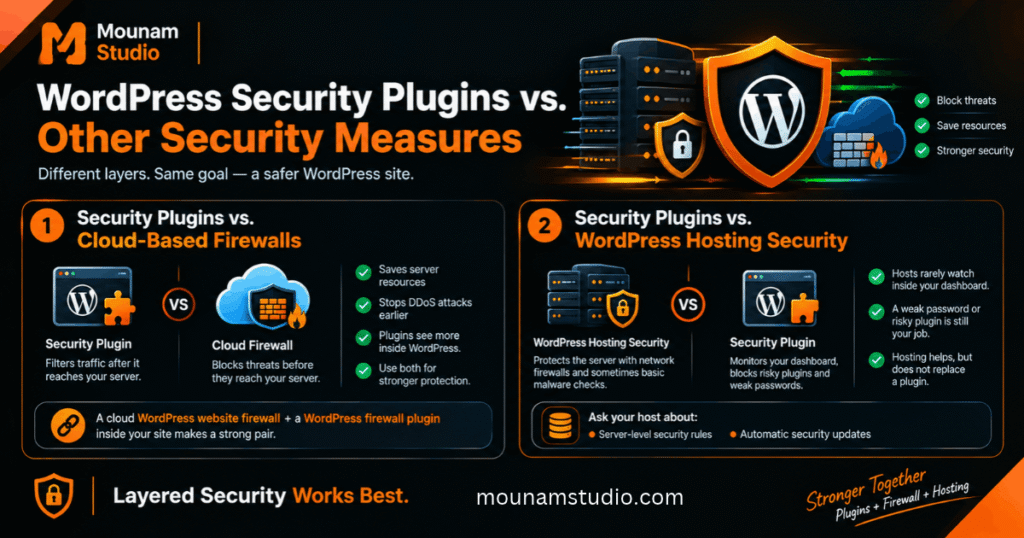
Security Plugins vs. Cloud-Based Firewalls
A plugin filters traffic after it reaches your server. A cloud firewall blocks it before it arrives. That saves server resources and stops DDoS attacks earlier. However, plugins see more of what happens inside WordPress. That is why many sites use both. A cloud WordPress website firewall plus a WordPress firewall plugin inside your site makes a strong pair.
Security Plugins vs. WordPress Hosting Security
Good hosts protect the server. WordPress hosting security often includes network firewalls and sometimes basic malware checks. However, hosts rarely watch what happens inside your dashboard. A weak password or a risky plugin is still your job. So hosting helps but does not replace a plugin. Ask your host about server-level security rules and automatic security updates.
Do You Need More Than One WordPress Security Plugin?
Usually not. Two full security plugins can clash and slow your site. Choose one main plugin. Then add a cloud firewall, a backup tool, or a vulnerability service if you need more. This keeps things light. It also protects security plugin compatibility. Always test a new tool on a staging site first.
How to Secure Your WordPress Website Beyond Plugins
No plugin works alone. Good habits matter just as much. Follow these WordPress security best practices: update everything, use strong logins, back up often, use HTTPS, and limit user access.
Run a WordPress security audit every quarter. Check users, plugins, and settings. A short session of security configuration auditing takes under an hour. Do it once and you will be ahead of most site owners.
Keep WordPress Core, Themes, and Plugins Updated
Updates fix known holes. Apply WordPress core updates quickly. Keep plugin and theme updates current too. Turn on automatic security updates for tools you trust. Then delete unused plugins and themes. Inactive code can still be hacked. Remove any outdated WordPress themes you no longer use. Fewer add-ons mean fewer doors for attackers.
Use Strong Passwords and Two-Factor Authentication
Use long and unique passwords. A password manager makes this easy. Turn on two-factor authentication (2FA) for every admin. Use an authenticator app and not SMS when possible. Good session management logs out idle users. Some sites also use passwordless authentication. Setup takes minutes and blocks most login attacks.
Schedule Regular Backups and Malware Scans
Follow the 3-2-1 rule. Keep three copies. Store them on two types of storage. Keep one copy off-site. Run daily malware scans on active sites. Weekly scans suit quiet blogs. Use database backup scheduling so your posts and orders stay safe. Test a restore once a year to confirm your website restoration plan works.
Use SSL, Secure Hosting, and Least-Privilege User Roles
SSL certificate protection encrypts data between your visitors and your site. Install it so your site loads over HTTPS. Choose a trusted host. Then apply least-privilege access policies. Give each user only the access they need. An editor does not need admin rights. Also run file permission checks so files are not open to everyone. Use secure WordPress configuration advice from your host.
What to Do If Your WordPress Website Gets Hacked
Stay calm and act in order. Change every password first. Restore a clean backup. Run a full scan. Update everything. Then review users and audit trails and login logs. A clear security incident response plan saves time. If Google flagged your site, request a review. Read Google’s hacked site guide. This is your path to WordPress website recovery.
Frequently Asked Questions About WordPress Security Plugins
You probably still have a few questions. That is normal. Below you will find quick and honest answers.
Each answer is short. Jump to the one you need. The full reviews above give more detail.
What Is the Best WordPress Security Plugin in 2026?
For most people it is Wordfence Security. It offers a strong firewall, a reliable WordPress malware scanner, and a generous free plan. Other tools win in special cases. MalCare is great for cleanup. Solid Security is great for logins. Compare these WordPress security solutions in the reviews above.
What Is the Best Free WordPress Security Plugin?
All-In-One Security is our top free pick. It gives you a security meter, login protection, and firewall basics at no cost. Its free plan lacks advanced scanning. Wordfence Free is another good choice if you want a scanner. Both rank high among free WordPress security plugins.
Are WordPress Security Plugins Necessary?
They are strongly recommended. A plugin catches threats you would never spot yourself. But it is not a magic shield. You still need updates, strong passwords, and backups. Think of it as a smart helper for WordPress website security and not a replacement for good habits.
Can I Use Multiple WordPress Security Plugins Together?
It is risky. Two plugins with the same features can clash and slow your site. A safer plan is one main plugin plus a cloud firewall or a backup tool. Choose tools that do different jobs. Always check security plugin compatibility before you add a second one.
How Often Should I Scan My WordPress Website for Malware?
Run automatic daily scans on active sites. Stores and busy blogs should never skip this. A quiet personal site can scan weekly. Also run a manual scan after big updates. Early WordPress threat detection keeps cleanup small and cheap.
Can a WordPress Security Plugin Prevent Every Hack?
No. No tool can promise that. Layered security works best. Combine a plugin with updates, 2FA, and backups. If something slips through you can restore a clean copy fast. That is why WordPress backup and recovery matters so much. Good WordPress hack prevention is about lowering risk.
How Much Does a WordPress Security Plugin Cost?
Many plugins offer free versions. Paid plans often start around a hundred dollars a year for a single site. Stores and agencies pay more. Cleanup services can cost extra. Prices change often. Check current pricing on each official site.
What Is the Difference Between a Security Plugin and a Firewall?
A firewall is one feature. It filters bad traffic. A security plugin bundles several protections. These include a firewall, scanning, login security, and alerts. Think of the firewall as one item in a bigger toolbox of WordPress security tools.
Conclusion
Protecting your site does not have to be hard. Wordfence, MalCare, and All-In-One Security are the best WordPress security plugins for most beginners. Pick the one that fits your needs and budget. Then add layers like backups and 2FA for stronger WordPress website protection.
Take action today. Choose a plugin. Run your first scan. Turn on two-factor login. These three steps take under fifteen minutes. Your future self will thank you.